Appendix C: Debugging
This appendix is a quick map of the debugging options available to a ticktrace program. It is not a tutorial, it's a "which tool when" reference. Deeper coverage of GDB/OpenOCD will come in a later revision once the on-chip debug surface in ticktrace is more mature.
The three workhorse approaches
Most embedded bugs get caught by printing things from inside the chip and looking at them on a host computer. ticktrace gives you three ways to do that, in increasing order of capability and integration cost.
1. UART over an external USB-serial adapter
The simplest setup. You wire a USB-to-serial dongle to the Pico 2's
GP0/GP1 pins, configure UART0 with uart0_init, and use uart0_puts
or uart0_putc to send bytes. Open a terminal on the host
(minicom, screen, picocom) at 115200 8N1 and the bytes appear.
| Property | Value |
|---|---|
| Hardware needed | USB-to-TTL adapter (~$3), 3 jumper wires (TX/RX/GND) |
| Bandwidth | ~11.5 KB/s at 115200 baud |
| Setup time | Seconds, works as soon as uart0_init returns |
| Failure modes | None silicon-related; lights work even on early boot |
| Blocks pins | GP0 and GP1 are committed to UART |
| Power cost | Negligible |
| Driver footprint | ~1 KB (src/uart.S) |
This is what you reach for when you need debug output and you don't
yet trust anything else. It works before USB bring-up, before clock
bring-up (at 12 MHz pre-PLL rates), and survives most flavours of
firmware brokenness. The examples/blinky_v01.S proves it works
without the M2 clock tree.
When to use: every project starts here. You graduate to USB CDC only when the cable becomes inconvenient or the bandwidth becomes limiting.
2. USB CDC (the chip's own USB controller)
The RP2350's on-chip USB controller, configured by src/usb.S, can
present itself as a USB CDC-ACM serial device. After
usb_cdc_init, the Pico 2 appears on the host as /dev/ttyACM0
(Linux) or a COM port (Windows), no extra hardware, just the USB-C
cable you're already using to power the board.
| Property | Value |
|---|---|
| Hardware needed | Just the USB-C cable that powers the Pico 2 |
| Bandwidth | ~1 MB/s practical for CDC (USB 1.1 Full Speed: 12 Mb/s gross) |
| Setup time | ~250 ms for USB enumeration; depends on USB clock being up |
| Failure modes | Won't work before pll_usb_48_mhz + USB enumeration |
| Blocks pins | The two USB pins (built into board) |
| Power cost | A few mA continuously |
| Driver footprint | src/usb.S is the biggest driver in the tree (~45 KB) |
When it works, it's the nicest debug surface, fast, one cable, no extra hardware. The tradeoff is that the USB driver is the most complex piece in ticktrace, and if you're debugging the USB driver you obviously can't rely on it for output. That's why every project should keep its UART path working as a fallback.
The examples/*_usb_demo.S files show the canonical pattern: do
basic clock + LED + USB bring-up in main, then use cdc_puts for
all log output.
When to use: routine development once USB is stable. Anything that needs more than a few hundred bytes/sec.
3. The DWT cycle counter
DWT, the Data Watchpoint and Trace unit, is a block in the
Cortex-M33 itself, not a peripheral. It includes a 32-bit free-running
cycle counter at DWT_CYCCNT (0xE0001004) that increments every
processor clock, once per ~6.67 ns at 150 MHz.
This is not a print mechanism. It is a measurement mechanism.
    bl      dwt_init                @ enable the counter (one-time)

    bl      dwt_read                @ r0 = cycle count before
    mov     r4, r0

    bl      my_function_under_test  @ run the code

    bl      dwt_read                @ r0 = cycle count after
    subs    r0, r0, r4              @ r0 = elapsed cycles
That's the whole API. src/trace.S gives you dwt_init,
dwt_read, and a couple of helpers; examples/trace_usb_demo.S
shows it counting cycles on a known busy loop (3,000,007 cycles for
a 3-million-iteration loop, including overhead).
| Property | Value |
|---|---|
| Hardware needed | None |
| Resolution | One processor clock cycle |
| What you measure | Anything between two dwt_read calls |
| Side effect on the code | None, DWT runs independently of the CPU |
| Limitation | No output channel of its own, pair with UART/CDC to log results |
| Driver footprint | src/trace.S, a few hundred bytes |
DWT is how you actually know whether your ISR fits in its cycle
budget, whether an optimisation helped, whether a "should be fast"
function is in fact fast. The sched_stats module
(chapter 12) wraps DWT around every task entry
and exit so you get worst-case-cycles-per-task accounting for free.
When to use: any time you're making a claim about timing. "This ISR runs in 30 cycles" deserves a DWT measurement, not a guess.
Beyond print debugging: GDB and OpenOCD
The full Cortex-M debug protocol, single-step, breakpoints, memory inspection, register dumps from a hung core, runs over SWD (Serial Wire Debug), a two-pin protocol exposed on the Pico 2's SWCLK/SWDIO pins (the three small pads near the USB connector).
To use it you need either:
- A second Pico flashed with the
picoprobefirmware acting as a USB-to-SWD bridge, or - A dedicated SWD probe (SEGGER J-Link, Black Magic Probe, etc.)
…plus host-side software: OpenOCD (or probe-rs) to drive the
probe, and GDB (arm-none-eabi-gdb) to give you a
debugger-style UI on top.
Once set up, you can:
- Pause the chip at any instruction.
- Inspect every register, including the NVIC, MPU, and DWT.
- Set hardware breakpoints (limited number, the M33 has six).
- Set data watchpoints (~four), break when memory at address X is written.
- Continue, step instruction, step source line.
This is genuinely powerful, and indispensable when print debugging runs out of steam (hard faults during early boot, race conditions between cores, peripherals that lock up the chip).
For now, ticktrace's coverage of SWD/GDB is intentionally thin. We will add a fuller setup recipe, probe firmware, OpenOCD configuration, GDB scripts for the ticktrace vector table, common-bug walkthrough, in a later revision of this book. Until then, see the Raspberry Pi Pico SDK debug guide for a complete probe-side setup; everything from the host onwards applies to ticktrace unchanged.
Choosing the right tool
Quick "is the code reaching here?"      →  UART or CDC puts
Streaming logs during normal operation  →  CDC
Pre-USB / early-boot diagnostics        →  UART (or LED blink codes)
"How many cycles did that take?"        →  DWT
"Worst-case latency of my ISR"          →  DWT + sched_stats
Stepping through a hang                 →  GDB + OpenOCD (future)
Catching a memory corruption            →  GDB data watchpoint (future)
If you take one rule away: measure with DWT, narrate with CDC, keep UART working as your last-resort safety net.
Three small habits that pay off
-
Print a banner at boot. Every ticktrace program should send something identifiable on its first UART/CDC output,
"ticktrace myapp v0.3", so when the chip is misbehaving you know which firmware is on it. -
Cycle-count anything you call "fast". A claim like "this ISR runs in 30 cycles" is free to verify with DWT and free to keep verifying as the code changes. Make it a habit, not a one-off.
-
Leave a debug pin. Reserve one GPIO as a scope/logic-analyser debug pin from the start. A
gpio_put(N, 1)at the top of an ISR andgpio_put(N, 0)at the bottom turns "I think this ISR is fast enough" into a measurement you can take with $20 of test equipment.
Where to read more
src/trace.Sanddocs/trace.md, DWT, ITM, TPIU, ETM details.src/uart.Sanddocs/uart.md, UART driver, including the IRQ-driven and DMA paths if your prints become a hot path.src/usb.Sanddocs/usb.md, USB CDC bring-up.examples/trace_usb_demo.S, a worked DWT example.examples/sched_usb_demo.S,sched_statsreporting per-task cycle counts over CDC.
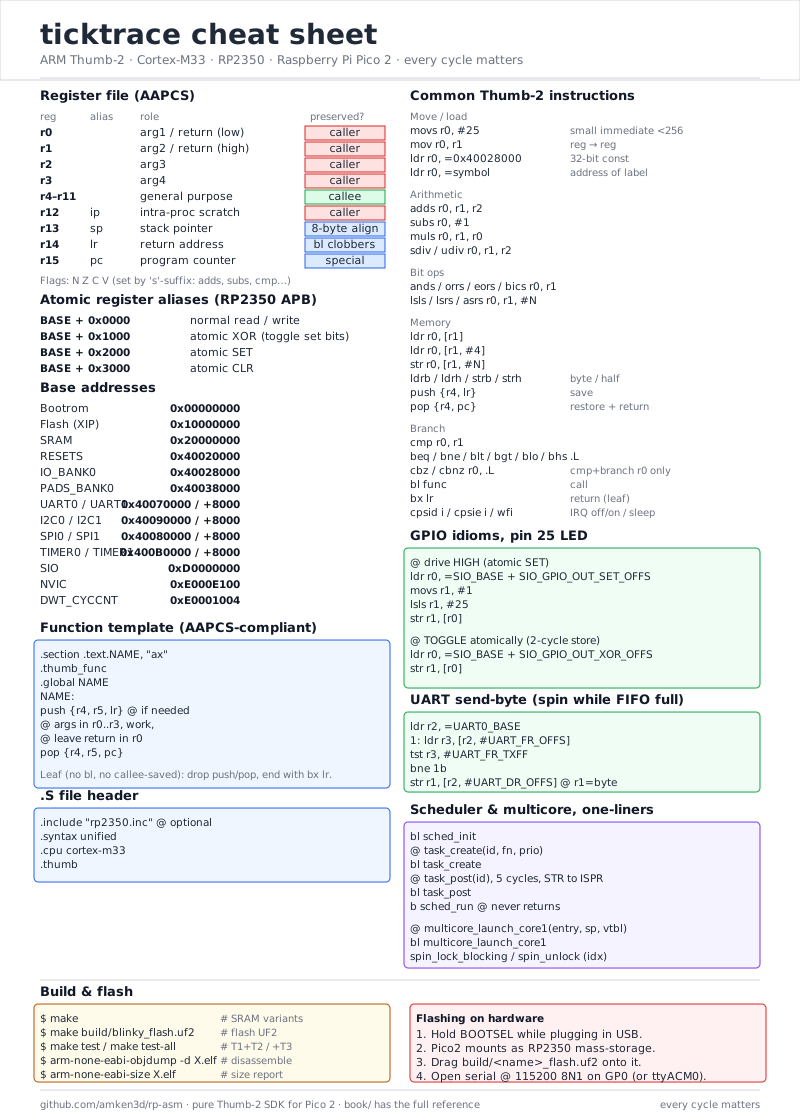
A printable summary of debug commands and the rest of the ticktrace
working set lives in Appendix B, and a
print-ready Letter/A4 version at
figures/cheat-sheet-print.svg.
← Appendix B: Cheat sheet · Table of contents · Appendix D: Memory layouts and execution patterns →