Chapter 6: Your first program: blinky
Time to read code.
Open src/main.S in your editor and we'll go through it line by line.
This is the program you flashed at the end of chapter 5, the one that
boots the RP2350, brings up the clock tree, and starts blinking the
green LED while a banner prints over UART.
The big picture
Before we read the source, here's the shape of the program in time.
Boot rom hands off, _reset runs the M33 prologue, main brings up
the chip, then we enter the forever loop.
sequenceDiagram
    autonumber
    participant Boot as Bootrom
    participant R   as _reset
    participant M   as main
    participant Drv as drivers
    Boot->>R: load SP, PC from vector table
    R->>R: enable FPU, seed RCP, point VTOR
    R->>R: zero .bss
    R->>M: b main
    M->>Drv: xosc_init / pll_sys_150 / pll_usb_48
    M->>Drv: clocks_init / tick_init / watchdog_disable
    M->>Drv: gpio_led_init / uart0_init / baud_fixup
    M->>Drv: uart0_puts(banner)
    loop forever
        M->>Drv: gpio_led_toggle
        M->>M:  busy-wait ≈ 250 ms
    end
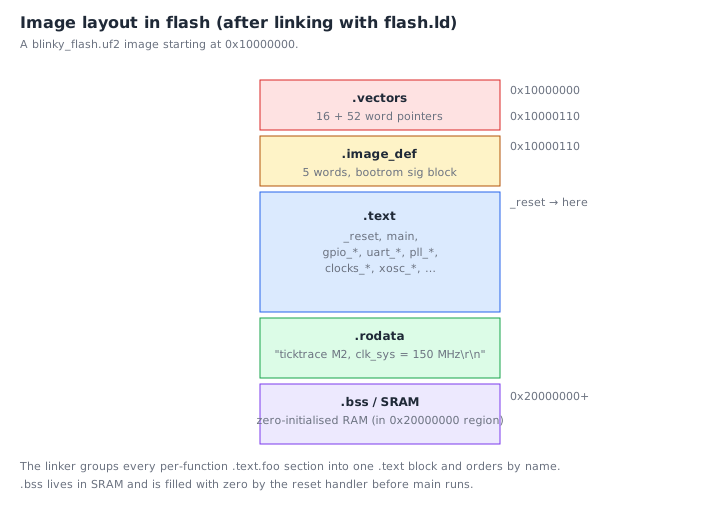
And here's where the bytes end up in flash:
The program in full
    .syntax unified
    .cpu    cortex-m33
    .thumb

    .equ DELAY_COUNT_150MHZ, 12500000

    .section .rodata.banner, "a"
banner:
    .asciz "ticktrace M2 - clk_sys = 150 MHz\r\n"

    .section .text.main, "ax"
    .thumb_func
    .global  main
main:
    @ ---- Clock tree bring-up ---------------------------------------------
    bl      xosc_init                       @ XOSC stable
    bl      pll_sys_150_mhz                 @ pll_sys = 150 MHz
    bl      pll_usb_48_mhz                  @ pll_usb = 48 MHz
    bl      clocks_init                     @ wire muxes
    bl      tick_init                       @ 1 MHz tick to TIMER0/1/WDG
    bl      watchdog_disable                @ explicit safe state

    @ ---- Peripheral init at the new clock rate ---------------------------
    bl      gpio_led_init                   @ LED on GP25
    bl      uart0_init                      @ wrong baud (computed for 12 MHz)
    bl      clocks_post_pll_uart_baud_fixup @ fix to 150 MHz divisors

    ldr     r0, =banner
    bl      uart0_puts

.Lloop:
    bl      gpio_led_toggle

    ldr     r0, =DELAY_COUNT_150MHZ
1:  subs    r0, #1
    bne     1b

    b       .Lloop
Thirty-five lines of source, including comments and blank lines. We will read it five times, once for each conceptual layer.
Pass 1: the assembler directives
The first three lines have nothing to do with the program. They are instructions to the assembler:
    .syntax unified
    .cpu    cortex-m33
    .thumb
.syntax unified, Use the modern, unified ARM/Thumb syntax (the one we've been writing throughout this book). The alternative is the pre-2008 "divided" syntax that distinguishes ARM and Thumb mnemonics; nobody uses it anymore..cpu cortex-m33, Tell the assembler which CPU we're targeting, so it knows which instructions are legal..thumb, Emit Thumb encodings (which is the only option on M33 anyway, but explicit is good).
These three lines appear at the top of every .S file in ticktrace.
Pass 2: the constants and data
.equ DELAY_COUNT_150MHZ, 12500000
.equ defines an assemble-time constant. Anywhere in the file we
write DELAY_COUNT_150MHZ, the assembler substitutes 12500000. This
is the C equivalent of #define.
Why 12,500,000? It is the number of times the inner busy-loop body needs to iterate to take about 250 ms at 150 MHz. We'll see why when we look at the loop itself.
    .section .rodata.banner, "a"
banner:
    .asciz "ticktrace M2 - clk_sys = 150 MHz\r\n"
This puts a string in read-only data at a label called banner.
Breaking it down:
.section .rodata.banner, "a", Start a new output section named.rodata.banner, with the "allocate" attribute (a), meaning it takes up space in the final image but isn't executable.banner:, A label. The address of the next byte will be remembered under this name..asciz "ticktrace M2 - clk_sys = 150 MHz\r\n", Emit the string, followed by a zero byte. (Without thez,.asciiwould omit the terminator.) The\r\nis the conventional terminal-friendly line-ending: carriage return, then newline.
So banner is the address of a NUL-terminated string sitting somewhere
in flash. We'll pass its address to uart0_puts later.
Pass 3: defining main
    .section .text.main, "ax"
    .thumb_func
    .global  main
main:
.section .text.main, "ax", A new section, with the "allocate" and "executable" attributes. Code goes here..thumb_func, The next symbol is a Thumb function. The assembler will set bit 0 of its address so thatbx/blto it works correctly..global main, Make the symbolmainvisible to the linker, so other files (in our case,startup.S) can call it.main:, The label itself.
The ticktrace reset handler in src/startup.S eventually does a
b main, which is how this function gets entered.
Pass 4: the boot sequence
    bl      xosc_init                       @ XOSC stable
    bl      pll_sys_150_mhz                 @ pll_sys = 150 MHz
    bl      pll_usb_48_mhz                  @ pll_usb = 48 MHz
    bl      clocks_init                     @ wire muxes
    bl      tick_init                       @ 1 MHz tick to TIMER0/1/WDG
    bl      watchdog_disable                @ explicit safe state
Six function calls. Each bl FOO ("branch and link to FOO") saves the
return address in lr and jumps to FOO. When FOO finishes it
returns to the next instruction here.
What each call does, briefly:
-
xosc_initturns on the 12 MHz crystal oscillator and waits for it to stabilise. The chip can now use the crystal as a clock source. -
pll_sys_150_mhzprograms PLL_SYS, a phase-locked loop, to multiply the 12 MHz crystal up to 150 MHz, and waits for lock. -
pll_usb_48_mhzdoes the same for PLL_USB, producing 48 MHz (which is what the USB controller and the ADC want). -
clocks_initflips the clock muxes so thatclk_sysandclk_periboth come from PLL_SYS (150 MHz) andclk_usb/clk_adccome from PLL_USB (48 MHz). Before this point the chip was still running at 12 MHz; after this point it's at 150 MHz. -
tick_initdivides the system clock down to produce a 1 MHz tick signal that feeds the TIMER0/1 peripherals and the watchdog prescaler. It's a one-time setup. -
watchdog_disableensures the chip's watchdog timer isn't armed. If you don't disable it explicitly, certain boot paths can leave it enabled and the chip will reset itself a few seconds in.
You don't need to know how these work internally yet. The point of
having them as named functions is that you don't have to. Each one is
documented in docs/clocks.md and friends; each one is implemented in
the matching src/*.S file; each one has tests in tests/unicorn/.
Today you're a user of those functions.
    bl      gpio_led_init                   @ LED on GP25
    bl      uart0_init                      @ wrong baud (computed for 12 MHz)
    bl      clocks_post_pll_uart_baud_fixup @ fix to 150 MHz divisors
Three more:
-
gpio_led_initconfigures GP25 as an output pin and drives it low to start. -
uart0_initbrings UART0 out of reset, configures the pads on GP0/GP1 for UART function, and sets the baud rate divisors. The subtlety: the baud divisors are computed assuming a 12 MHz peripheral clock (the rate at v0.1, before we added PLLs). -
clocks_post_pll_uart_baud_fixuprewrites those divisors to match the actualclk_perirate of 150 MHz, so the UART produces real 115200-baud output instead of garbage.
The order matters: you can't fix the baud until the UART has been initialised, and you can't initialise the UART correctly until you know the clock is running.
Pass 5: the message and the loop
    ldr     r0, =banner
    bl      uart0_puts
This is the canonical "call a function with a string argument" idiom.
ldr r0, =banner loads the address of the banner label into r0.
Then bl uart0_puts calls uart0_puts, which by AAPCS convention
expects its first argument in r0.
uart0_puts walks the bytes at that address, pushing each one into
the UART transmit FIFO, until it hits the NUL terminator. We'll
implement our own version in chapter 10.
.Lloop:
    bl      gpio_led_toggle

    ldr     r0, =DELAY_COUNT_150MHZ
1:  subs    r0, #1
    bne     1b

    b       .Lloop
The forever-loop. Three pieces:
-
.Lloop:andb .Lloopform the outer loop. The leading.Lis a GNU convention for local labels, symbols that exist only within this assembly file, not exposed to the linker. We use it to avoid polluting the global namespace. -
bl gpio_led_toggleflips GP25's state. Internally this is a two-cycle store to theSIO_GPIO_OUT_XORatomic-XOR alias we met in chapter 4. The LED goes from off to on, or from on to off. -
The inner delay loop:
    ldr     r0, =DELAY_COUNT_150MHZ
1:  subs    r0, #1
    bne     1b
ldr r0, =12500000puts the iteration count in r0.1:is a local numeric label, these are reusable; you can have many1:s in a function.subs r0, #1decrements r0 and sets the zero flag if the result is zero.bne 1bmeans "branch to the nearest label1backwards if not equal (not zero)". So this loops 12,500,000 times, doing essentially nothing.Each iteration is two instructions and takes about 3 cycles on the M33. 12,500,000 iterations × 3 cycles ÷ 150,000,000 cycles/second ≈ 0.25 seconds. That's the half-period; the full blink is half a second; the apparent rate is 2 Hz.
Yes, busy-looping is a wasteful way to delay. The chip burns 100 mA doing nothing. We'll meet better approaches (
wait_for_interrupt, timer-driven scheduling) in chapter 11.
Where does the program go after main returns?
It doesn't return. The unconditional b .Lloop at the bottom sends
control back to the top of the loop forever. If you removed it and
let execution "fall through" past the end of main, you'd hit
whatever happened to be the next instruction in flash, usually random
data, which the CPU would try to execute and trap on.
A microcontroller's main must be an infinite loop. There is no
operating system to return to.
How does main get called in the first place?
The reset handler in src/startup.S ends with b main. The bootrom
loads the vector table from the start of your image, reads word 0 as
the initial stack pointer and word 1 as the initial program counter,
and jumps to that PC. That PC is _reset. _reset finishes the M33
prologue (enabling the floating-point coprocessor, seeding the random
canary protection, pointing VTOR at the vector table) and then
branches to main. Open src/startup.S and skim it, you've seen
enough by now that most of it will make sense.
Building it yourself
If you want to modify and rebuild this exact program:
$ vim src/main.S        # edit
$ make build/blinky_flash.uf2
$ cp build/blinky_flash.uf2 /media/$USER/RPI-RP2/
Then watch the LED. Try doubling DELAY_COUNT_150MHZ, does it blink
half as fast? (It should.)
What is in that 1.2 KB?
After your first build the binary is roughly 1,200 bytes. For a 35-line source file that feels large. Here is where each byte goes:
| What | ~Bytes | Notes |
|---|---|---|
main() |
64 | The 35-line source you just read |
| Banner string | 36 | .asciz "ticktrace M2…\r\n" + NUL + alignment pad |
| Literal pool | 8 | Constants materialized for ldr r0, =banner and =DELAY_COUNT_150MHZ |
| Vector table | 64 | Initial SP, _reset PC, plus reserved exception-handler slots |
_reset handler |
~100 | FPU enable, RCP seed, VTOR setup, .bss zero loop, b main |
| Driver library | ~930 | xosc_init, 2× PLL, clocks_init, tick_init, watchdog_disable, gpio_led_init, uart0_init, baud_fixup, gpio_led_toggle, uart0_puts |
| Total | ~1,202 |
The headline: your logic is 64 bytes. The other ~1.1 KB is the
minimum infrastructure any bare-metal Cortex-M33 needs before main
can run — a vector table, a reset handler that prepares the CPU, and
the clock and peripheral drivers you call. On a chip with no OS,
none of that can be left out.
The cost amortises quickly. A second driver function costs 40–80
bytes; a second call to an existing driver in main costs four
bytes (one bl instruction). By the time you have five peripherals
running, main is still tiny and the driver overhead is already paid.
You can inspect the live numbers yourself:
$ arm-none-eabi-size build/blinky_flash.elf
   text    data     bss     dec     hex filename
   1202       0      16    1218     4C2 blinky_flash.elf
$ arm-none-eabi-nm --print-size --size-sort build/blinky_flash.elf
nm --size-sort lists every symbol in ascending size order. main
appears near the top; the larger driver routines sit at the bottom.
Try it: you will see the table above reflected in the output.
What you now understand
Take a moment to appreciate where you are. You can read every line of
a real piece of firmware. You know what each directive does, what each
function call accomplishes, why the loop is shaped the way it is, and
how the program enters the chip. The ticktrace source tree is no longer
opaque; you can open any src/*.S file and the language will mostly
make sense, even if specific peripheral details are still mysterious.
Exercises
-
Halve the blink rate. Edit
DELAY_COUNT_150MHZso the LED blinks at 1 Hz instead of 2 Hz. Build, flash, observe. -
Replace the banner. Change the
.ascizstring to something personal. Rebuild and watch the serial output. (Note: keep the\r\nat the end, most terminal programs need both.) -
Count cycles. The inner busy-loop is
subs r0, #1/bne 1b. At 150 MHz, how many seconds wouldDELAY_COUNT_150MHZ = 1produce? (About 20 nanoseconds.) -
Why the order? Why does
clocks_post_pll_uart_baud_fixupcome afteruart0_initand not before? (Becauseuart0_initwrites IBRD/FBRD assuming 12 MHz; the fixup overrides them. If you reversed the order, the fixup would happen first and then immediately get overwritten with the wrong values.) -
A faulty change. Suppose you removed the trailing
b .Lloop. The LED would blink once and then the chip would do something unpredictable. Why? (Execution falls pastmaininto whatever bytes happen to be next in flash; the CPU tries to execute them and will eventually fault.)
The next chapter rounds out the syntax reference so you can read the driver code, not just the user code.
← Chapter 5: Setting up ticktrace · Table of contents · Chapter 7: Assembler syntax and instructions →