Chapter 10: UART: talking to the host
A blinking LED is satisfying but limited. To debug real programs you need a way for the chip to say things, print numbers, log states, report errors. The classic way to do that on a microcontroller is a UART: a serial port that sends bytes one at a time over a single wire.
This chapter introduces UART, walks through what the ticktrace UART driver
does for you, and shows how to write your own puts function.
What is a UART?
UART stands for Universal Asynchronous Receiver/Transmitter. The "asynchronous" part means there's no clock signal shared between the two ends; instead, both sides agree on a fixed baud rate (bits per second) and use the bit timing to decode each frame.
A standard frame is:
- One start bit (line goes low)
- 8 data bits (least-significant first)
- One stop bit (line goes high)
That's 10 bit-times per byte. At 115200 baud, the rate ticktrace defaults to, each byte takes about 87 µs.
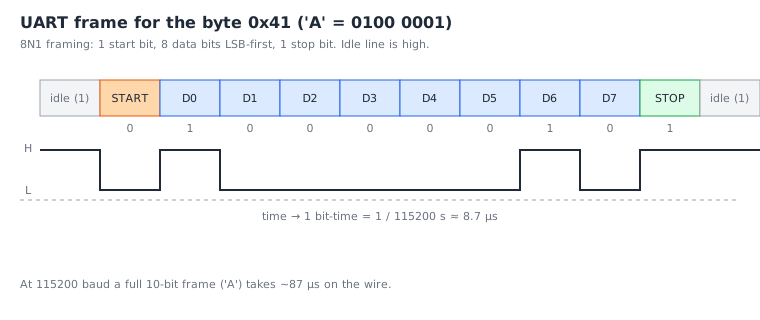
The Pico 2 has two UARTs on chip: UART0 and UART1. UART0's default TX pin is GP0; we send bytes by writing them to a transmit register, the hardware shifts them out at the configured rate.
The UART block on the RP2350 is an ARM PL011, an industry-standard design. Many embedded chips use a PL011 or a close cousin.
The PL011 register set
The PL011 has a handful of relevant registers. The ones we care about right now:
| Name | Offset | Function |
|---|---|---|
UARTDR |
0x000 | Data register, write to send, read to receive |
UARTFR |
0x018 | Flag register, busy/full/empty status |
UARTIBRD |
0x024 | Integer baud divisor |
UARTFBRD |
0x028 | Fractional baud divisor |
UARTLCR_H |
0x02C | Line control: data bits, stop bits, parity, FIFO enable |
UARTCR |
0x030 | Main control: enable, TX enable, RX enable |
UARTIMSC |
0x038 | Interrupt mask set/clear |
UARTRIS |
0x03C | Raw interrupt status |
UARTMIS |
0x040 | Masked interrupt status |
UARTICR |
0x044 | Interrupt clear |
The base address is 0x40070000 for UART0 and 0x40078000 for UART1.
We won't program every bit, that's what the driver does, but it's worth knowing the shape of the hardware so the driver isn't a black box.
Bringing a UART up
The init sequence has a particular shape, six steps in order, and the order matters because the PL011 latches some settings only on specific writes:
flowchart TD
    A[uart0_init called] --> B[Clear RESETS bit for UART0]
    B --> C[Poll RESETS_DONE until bit shows reset complete]
    C --> D[Set GP0/GP1 FUNCSEL = UART, clear ISO/OD on pads]
    D --> E[Compute IBRD + FBRD for target baud]
    E --> F[Write IBRD, then FBRD]
    F --> G[Write LCR_H : latches baud, sets 8N1, enables FIFO]
    G --> H[Write CR = UARTEN | TXE | RXE]
    H --> I[UART is ready]
To use UART0 at 115200 baud, the driver does roughly the following:
- Clear the reset bit in the
RESETSblock for UART0, and pollRESETS_RESET_DONEuntil the bit shows the peripheral has come out of reset. - Route GP0 and GP1 to the UART function (FUNCSEL = 2) via IO_BANK0, and clear the ISO/OD reset bits on those pads.
- Compute the baud divisors. The PL011 divides
clk_periby16 × (IBRD + FBRD/64)to get the baud rate. For 115200 baud at 150 MHzclk_peri, the divisor is ~81.38, so IBRD=81 and FBRD=24. - Write IBRD, FBRD, then LCR_H in that order. The PL011 latches the new baud rate only when LCR_H is written, so this ordering matters.
- Set LCR_H to 8 data bits, 1 stop bit, no parity, FIFO enabled.
- Set CR to enable the UART (
UARTEN), enable TX (TXE), and enable RX (RXE).
After this, writes to UARTDR are transmitted.
In ticktrace you don't have to do this yourself; you call uart0_init
(which in turn calls uart_init(0, 115200, 12000000)) and the driver
does the dance. Take a moment to read src/uart.S, at this point you
should be able to follow most of it. The M_UART_BASE_FROM_IDX macro
at the top is a particularly nice idiom: it converts an index 0/1 into
the base address without a multiply.
The flag register
The trickiest part of writing a UART driver is knowing when the hardware is ready to accept another byte. The PL011 has a 32-byte transmit FIFO; you can write 32 bytes back-to-back, but the 33rd will either be lost or you'll need to wait.
The UARTFR flag register tells you the FIFO state. Two bits matter:
- TXFF (bit 5): TX FIFO full. If 1, don't write more.
- BUSY (bit 3): the transmitter is still shifting bits out. Useful if you want to wait for the wire to drain before shutting things down.
The "send a byte, blocking" idiom is:
    @ Spin while TX FIFO is full
    ldr     r2, =UART0_BASE
1:  ldr     r3, [r2, #UART_FR_OFFS]
    tst     r3, #UART_FR_TXFF
    bne     1b
    str     r1, [r2, #UART_DR_OFFS]     @ byte in r1 -> send
Read flag register, test the TXFF bit, loop if set; otherwise write the byte. That's the entire transmit primitive.
Writing your own puts
Now let's build something. We're going to write a my_puts function:
take a pointer to a NUL-terminated string, send every byte to UART0,
return.
    .include "rp2350.inc"
    .include "uart.inc"

    .syntax unified
    .cpu    cortex-m33
    .thumb

    .section .text.my_puts, "ax"
    .thumb_func
    .global  my_puts
my_puts:
    @ r0 = pointer to string.  We need a callee-saved register to keep
    @ the pointer across the inner busy-wait.
    push    {r4, r5, lr}
    mov     r4, r0                  @ r4 = string pointer
    ldr     r5, =UART0_BASE         @ r5 = UART base, kept across iterations

.Lnext_byte:
    ldrb    r0, [r4]                @ r0 = *p (zero-extended)
    cbz     r0, .Ldone              @ end of string?

    @ Wait for room in TX FIFO
1:  ldr     r1, [r5, #UART_FR_OFFS]
    tst     r1, #UART_FR_TXFF
    bne     1b

    @ Send the byte, advance the pointer
    str     r0, [r5, #UART_DR_OFFS]
    adds    r4, #1
    b       .Lnext_byte

.Ldone:
    pop     {r4, r5, pc}
Walk through:
-
We push
r4,r5, andlr. Three words; combined with the pre-existing alignment that's 12 bytes pushed, which would unalign the stack. We need a fourth: typical fix ispush {r4, r5, r6, lr}and accept that we're saving one extra register. Or we can add a dummy:push {r4, r5, r7, lr}(any non-volatile we don't use). Let's do that. -
Better:
push {r4, r5, r7, lr} @ 16 bytes, aligned ... pop {r4, r5, r7, pc} -
We keep the string pointer in
r4and the UART base inr5so they survive across loop iterations, registersr0–r3get clobbered by the busy-waitldr/tstcycle if it took a long route. -
ldrb r0, [r4]loads one byte (zero-extended) from the address inr4. -
cbz r0, .Ldoneis "compare and branch if zero", a single instruction that combines a zero-test and a branch. It's the natural way to test for the NUL terminator. -
The inner
1:loop polls the flag register; thestrwrites the byte.
The actual ticktrace uart_puts_blocking does the same thing, with
attention to a few extra details (notably, the v0.1 byte-trace
compatibility shim mentioned in the driver comments). Read
src/uart.S from line 1 down to the end of uart0_puts and you'll
see every concept we've discussed.
A complete example program
Here is a full standalone program, examples/myhello.S if you want
to add it to your tree:
    .syntax unified
    .cpu    cortex-m33
    .thumb

    .section .rodata.banner_my, "a"
banner:
    .asciz "hello from chapter 10!\r\n"

    .section .text.main, "ax"
    .thumb_func
    .global  main
main:
    bl      xosc_init
    bl      pll_sys_150_mhz
    bl      pll_usb_48_mhz
    bl      clocks_init
    bl      uart0_init
    bl      clocks_post_pll_uart_baud_fixup

    ldr     r0, =banner
    bl      uart0_puts

.Lhalt:
    b       .Lhalt
Save that as examples/myhello.S and rebuild:
$ make build/myhello_flash.uf2
Hold BOOTSEL, plug in, drag, watch a serial terminal at 115200 8N1 on GP0. You should see the banner once and then nothing.
What about USB?
For a desktop user, hooking up an external USB-to-serial adapter is
annoying. There's a better way on the Pico 2: the chip's USB
controller can present itself as a USB CDC (Communications Device
Class) serial device, so the Pico shows up as /dev/ttyACM0 on Linux
without any extra hardware.
The ticktrace USB driver (src/usb.S) implements this. Many of the
*_usb_demo.S examples use it. Reading the USB driver is a much
longer journey than reading the UART driver, USB is genuinely
complicated, so we don't take that detour in this book. But know
that the interface the rest of your code sees is similar:
cdc_putc(byte), cdc_puts(ptr), cdc_getc().
Exercises
-
Bit time math. At 115200 baud, how long is one bit-time? How long does a 10-bit frame take? How many bytes per second can the wire carry? (8.68 µs per bit, 86.8 µs per frame, ~11520 bytes/s.)
-
Decode a frame. Looking at the UART frame figure, what byte is
0100 0001read LSB-first? (0x41, ASCII 'A'.) -
Why the order? Looking at the init flowchart, what happens if you write
LCR_HbeforeIBRD/FBRD? (The new baud divisors don't take effect until LCR_H is written, so the UART runs at the old rate. Writing LCR_H twice is also a valid alternative, the second write latches.) -
Spin-loop reasoning. In our
my_puts, why is the FIFO-full poll inside the per-byte loop and not outside it? (The FIFO is 32 bytes deep, for a short string, the loop never spins. For a long string the FIFO fills up around byte 32 and we wait per-byte after that. Polling once at the start would only let us send 32 bytes.) -
A buggy alternative. Suppose someone writes:
    ldr     r2, [r5, #UART_FR_OFFS]
    tst     r2, #UART_FR_TXFF
    beq     send                @ ← jump if not full
    b       1f
send:
    str     r0, [r5, #UART_DR_OFFS]
1:
What does this do? (Drops bytes when the FIFO is full instead of waiting. Sometimes that's what you want, non-blocking sends, but it's a different contract from
puts.)
What's next
The final substantive chapter introduces interrupts, the mechanism that lets hardware events (a timer firing, a UART byte arriving) call your code without you polling for it.
← Chapter 9: GPIO and memory-mapped I/O · Table of contents · Chapter 11: Timers and interrupts →