Chapter 2: What is assembly language?
Before we touch a Pico, let's get clear on what assembly is.
The two-sentence answer
A CPU executes binary instructions, patterns of bits the silicon knows how to interpret. Assembly language is a human-readable, one-to-one spelling of those instructions, so that you can write them without juggling hex by hand.
That's it. There is no magic; there is no runtime. An assembler is just
a translator that turns mov r0, #25 into the specific 16- or 32-bit
pattern the chip recognises as "put the number 25 into register zero".
The pieces of a CPU
To write assembly you need a working mental model of what's inside the chip. There are only three things to know.
1. Registers
A register is a small, named storage slot inside the CPU itself.
On the ARM Cortex-M33 you have 16 of them, named r0 through r15.
Each holds 32 bits, a single 4-byte word.
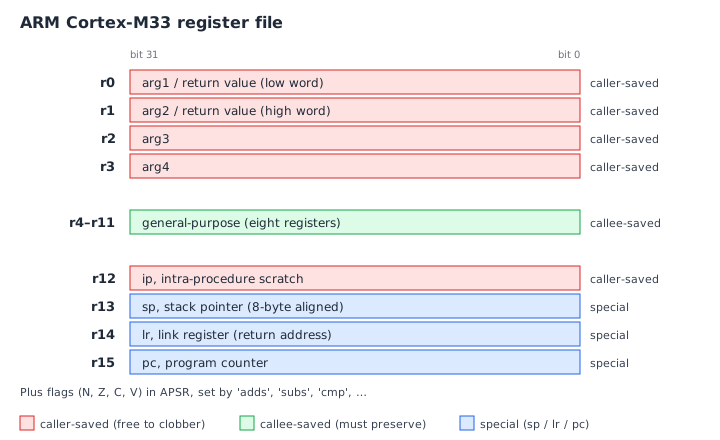
We'll come back to this picture in detail in chapter 4 and chapter 8. For now, just register the shape: sixteen named slots, each 32 bits wide.
Registers are fast. Reading or writing one usually takes a single cycle. Compare that with RAM, which on the RP2350 takes a few cycles even in the best case. Most of what assembly does is move values between registers, do arithmetic on them, and occasionally store them back to memory.
A few of the registers are special:
r13is the stack pointer (spfor short). It points at the current top of the call stack.r14is the link register (lr). When you call a function, the return address is stashed here.r15is the program counter (pc). It points at the instruction about to execute. Writing to it is how branches work under the hood.
The other thirteen, r0 through r12, are general-purpose. You can
use them for whatever you like, subject to a few conventions we'll meet
in chapter 8.
2. Memory
Outside the CPU there's a much bigger, much slower pool of storage: memory. On the RP2350 this is 520 KB of SRAM. Every byte has an address, a number, and instructions like "load" and "store" move data between registers and memory.
You can't add two numbers that live in memory directly. The pattern is always:
- Load value A from memory into a register.
- Load value B from memory into another register.
- Add them in registers.
- Store the result back to memory.
This load-store discipline is the defining feature of RISC ("reduced
instruction set computer") architectures like ARM. It is not how an
x86 instruction set works, add [some_address], 5 is perfectly legal
on x86, but it is how every modern phone, tablet, and most embedded
chips work.
3. Instructions
An instruction is a single command the CPU executes. There are only a few kinds:
- Data movement.
movcopies one register to another or loads an immediate constant.ldrloads from memory;strstores to memory. - Arithmetic and logic.
add,sub,and,orr,lsls(left-shift), and so on. - Comparison.
cmpsubtracts two values but throws away the result, setting flags (zero, negative, carry, overflow) that the next branch instruction looks at. - Branches.
b labeljumps unconditionally.beq labeljumps only if the zero flag is set.bl func("branch and link") jumps and saves the return address inlr, that's how function calls work.
That is the entire toolkit. Even the most elaborate program, a 1300-page operating system kernel, a web browser, this very text editor is, somewhere inside, a sequence of these primitive instructions.
The CPU runs that sequence in a tight loop:
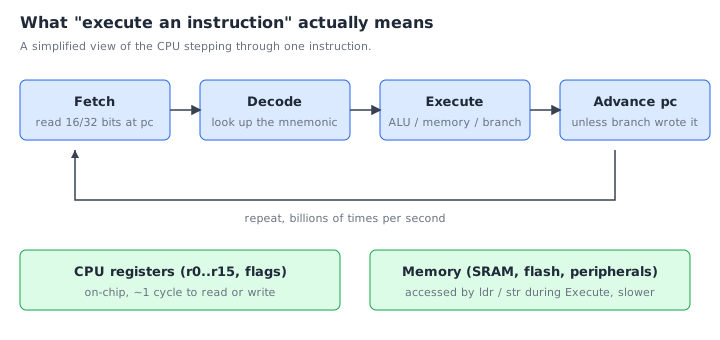
At 150 MHz this loop runs 150 million times a second. Every loop body either burns a cycle doing arithmetic in registers, or pays a few extra cycles to load/store memory. Programs are nothing but very long trajectories through this loop.
A tiny example
Here is an actual program that adds 3 and 4 and stops:
    movs    r0, #3      @ r0 = 3
    movs    r1, #4      @ r1 = 4
    adds    r0, r0, r1  @ r0 = r0 + r1
1:  b       1b          @ loop forever
Read it line by line.
movs r0, #3puts the literal value 3 into register r0. The#marks an immediate constant.movs r1, #4puts 4 into r1.adds r0, r0, r1computes r0 + r1 and stores it in r0. (After this, r0 holds 7.)1:is a local label.b 1bmeans "branch to the nearest label1backwards". The CPU spins on that line forever, because a microcontroller has nowhere else to go when its program "ends".
The @ character starts a comment in GNU ARM assembler syntax. You'll
see them everywhere in ticktrace.
That program, assembled, is six bytes of machine code. Six bytes is a complete, runnable program. Welcome to the metal.
Why does the s matter in movs?
You may have spotted it: mov versus movs, add versus adds. The
trailing s means "and update the condition flags". adds r0, r0, r1
adds and sets the zero/negative/carry/overflow flags so the next
conditional branch can react to the result. Plain add adds but
leaves the flags alone.
On the Cortex-M0+ inside the original Raspberry Pi Pico, almost every
short-form instruction sets flags whether you want to or not, the
s is encoded into the 16-bit instruction shape. On the Cortex-M33
inside the Pico 2 you have more flexibility. We'll come back to this in
chapter 4.
Mnemonics, opcodes, and the assembler
When the assembler sees movs r0, #3, it looks up the bit pattern for
"move-immediate-with-flag-update", fills in the register field (r0 = 0)
and the immediate field (3), and emits the 16-bit value 0x2003. That's
all an assembler does, it is a glorified table lookup.
The word movs is called a mnemonic. The bit pattern is called an
opcode (more precisely the opcode and operand fields packed
together). You read mnemonics. The CPU reads opcodes. They are the same
information.
What about labels, sections, and directives?
Real assembly files contain more than instructions. They contain:
- Labels like
main:or1:, names attached to addresses. - Directives like
.section .textor.equ FOO, 42, instructions to the assembler, not to the CPU. They control output layout, define constants, align things, and so on. - Comments,
@ ...to end of line.
Chapter 7 covers the syntax in detail. For now, when you see something that starts with a dot, it's a directive; when you see something that ends with a colon, it's a label.
Exercises
-
Trace the tiny example. Walk through the four-instruction program above on paper. After each instruction, write down the value of
r0andr1. What's the final state? (Answer: r0 = 7, r1 = 4, and the CPU loops onb 1bforever.) -
Spot the directive. In the program below, mark each line as either instruction, label, directive, or comment.
    .section .text.foo, "ax"     @ A
foo:                             @ B
    movs    r0, #42              @ C
    bx      lr                   @ D
(A is a directive, B is a label, C is an instruction with a trailing comment, D is an instruction.)
-
movvsmovs. Why doaddsandsubsexist whenaddandsubalready do the arithmetic? Find one place this distinction would matter for control flow. (The flag-settingsform lets the next conditional branch react.adds r0, #1followed bybeqjumps when the result is zero; plainaddwould leave the flags from whatever happened earlier.) -
Read a number. What is the value of the 16-bit Thumb encoding
0x2003? Refer back to the section on mnemonics and opcodes.
What's next
You now know enough vocabulary, register, memory, instruction, label to read any assembly program. The next two chapters give you the specific context for our assembly: the RP2 chip family, and the ARM Cortex-M33 core that runs our code.
← Chapter 1: Introduction · Table of contents · Chapter 3: The RP2 family →