Chapter 3: The RP2 family
The "RP2" in ticktrace refers to the family of microcontrollers designed by Raspberry Pi Ltd themselves, first the RP2040 (launched in 2021) and then the RP2350 (launched in 2024). They are the silicon at the heart of the Raspberry Pi Pico and Pico 2 boards.
This chapter is a tour of what these chips are, how they differ, and why ticktrace targets the RP2350 specifically.
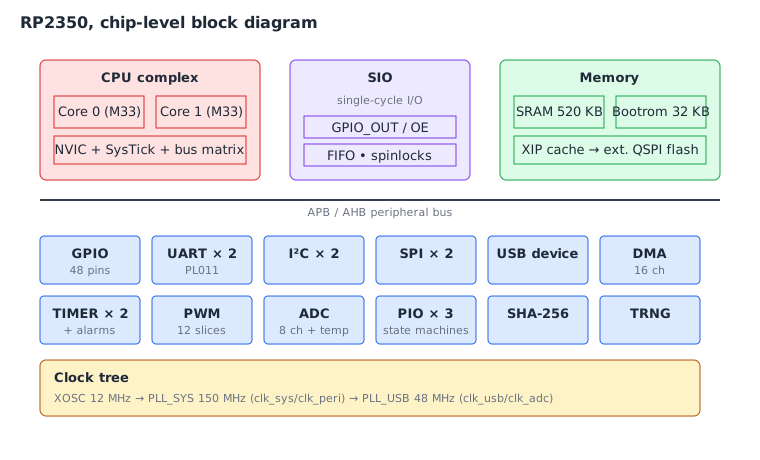
What is a microcontroller?
A microcontroller is a chip that contains, on a single die:
- One or more CPU cores
- Some RAM
- Some non-volatile storage (usually flash)
- A bunch of peripherals, UART, SPI, I2C, USB, ADC, timers, GPIO
- A clock generator
- A bootloader in ROM
A microcontroller is the whole computer. There is no separate northbridge, no DDR memory chip, no BIOS firmware on a separate flash, no PCIe video card. You plug it in, it boots, it runs your program. Many microcontrollers sell for less than the cost of a coffee.
This integration is what makes embedded programming feel so direct. The peripheral you want to talk to is on the same chip as your CPU, addressable through ordinary memory addresses. There's no kernel driver in the way.
The RP2040 (Raspberry Pi Pico)
The RP2040, released in 2021, was Raspberry Pi's first chip. It has:
- Two ARM Cortex-M0+ cores at up to 133 MHz
- 264 KB SRAM
- No internal flash (boards usually pair it with an external 2 MB QSPI flash chip)
- 30 multi-function GPIO pins
- Two UARTs, two SPIs, two I2Cs
- A USB 1.1 device/host controller
- 16-channel DMA
- PIO, Programmable I/O, two state-machine engines that can implement custom peripheral protocols
The Cortex-M0+ is the smallest, simplest CPU in ARM's lineup. It has a
limited Thumb-only instruction set, no hardware divide, no DSP
extensions, and only 16-bit instructions. This makes it cheap and
power-efficient. It also makes it slightly awkward to write assembly
for: you have to be careful which registers you touch with which
instructions, because the M0+ encoding can only address r0–r7 from
many opcodes.
The RP2350 (Raspberry Pi Pico 2)
The RP2350, released in 2024, is the chip ticktrace targets. It is a substantial upgrade from the RP2040:
| Feature | RP2040 | RP2350 |
|---|---|---|
| CPU cores | 2× Cortex-M0+ | 2× Cortex-M33 (plus 2× RISC-V Hazard3, switchable) |
| Max clock | 133 MHz | 150 MHz |
| SRAM | 264 KB | 520 KB |
| Internal flash | None | None (Pico 2 board adds 4 MB QSPI) |
| GPIO pins | 30 | 48 |
| Floating point | Software only | Optional FPU on Cortex-M33 |
| Security | None | TrustZone-M, signed boot, OTP |
| ADC | 12-bit, 4ch + temp | 12-bit, 8ch + temp |
| SHA-256 | None | Hardware accelerator |
| TRNG | None | Hardware RNG |
The headline change for our purposes is the CPU. The Cortex-M33 is a much more capable processor than the M0+:
- Full Thumb-2 instruction set, every register (
r0–r12) is usable in every common encoding, plus 32-bit instructions for things the 16-bit ones can't express. - Hardware integer divide.
- DSP-style multiply-accumulate instructions.
- An optional FPU (the Pico 2 silicon ships with it enabled).
- A more powerful interrupt controller and more flexible memory protection.
You can also boot the RP2350 into a RISC-V mode where two Hazard3 cores replace the ARM ones, sharing the same peripherals. ticktrace ignores this entirely and runs the chip as a pair of Cortex-M33s. (If you ever want to learn RISC-V assembly, this chip is also a friendly place to do it, but that's a different book.)
What's on the Pico 2 board
The Raspberry Pi Pico 2 is a small (51 × 21 mm) PCB built around the RP2350. It adds:
- A 12 MHz crystal oscillator (the chip's clock source)
- 4 MB of external QSPI flash for program storage
- A USB-C connector wired to the RP2350's USB controller
- A green LED on GP25, which you'll be blinking shortly
- A BOOTSEL button that, when held during reset, puts the chip into USB Mass Storage Class mode so you can drag-and-drop firmware
There is also a Pico 2 W variant with onboard Wi-Fi/Bluetooth via an extra chip; ticktrace doesn't currently use the wireless, but everything else on the W is identical to the non-W board.
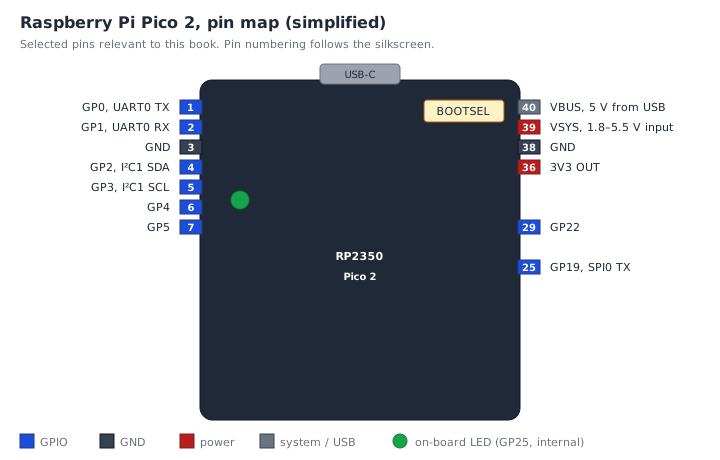
We'll meet most of these pins again in later chapters: GP0/GP1 in chapter 10 (UART), GP25 in chapter 6 and chapter 9 (LED), and the BOOTSEL button in chapter 5 (flashing).
The boot sequence (quick preview)
When you power on a Pico 2, here's what happens:
flowchart TD
    A[Power on / reset] --> B{BOOTSEL held?}
    B -- yes --> M[Bootrom: present as USB Mass Storage<br/>RPI-RP2 : drag-and-drop mode]
    B -- no  --> S[Bootrom: scan flash for IMAGE_DEF block]
    S --> V{Valid signature?}
    V -- no  --> M
    V -- yes --> R[Load SP from word 0, PC from word 1<br/>jump to _reset]
    R --> P[_reset: enable FPU, seed RCP,<br/>set VTOR, zero .bss]
    P --> C[main: clock tree → peripherals → loop]
- The RP2350's internal bootrom runs first. It is a 32 KB read-only program baked into the silicon at Raspberry Pi's factory.
- The bootrom checks whether BOOTSEL is held. If so, it presents itself as a USB Mass Storage device, that's the "drag-and-drop a UF2 file" mode.
- Otherwise, it reads the first few hundred bytes of QSPI flash,
verifies an
IMAGE_DEFsignature block, and jumps to your firmware's reset handler. - Your reset handler sets up the C-runtime-style state (stack pointer,
.bss, vector table), brings up the clock tree, and calls
main.
ticktrace provides all of step 4 for you, see src/startup.S and
src/main.S. From your perspective, "boot" just means "main gets
called". We will read the bootrom-to-main handoff in chapter 6.
Why an RP2350 and not, say, an STM32?
There are dozens of microcontroller families with ARM Cortex-M cores. Why this one?
- Excellent documentation. The RP2350 datasheet is unusually clear and complete by industry standards. Every register is explained.
- Open-friendly. Raspberry Pi publishes the bootrom source, the pico-sdk, the silicon errata, and even the chip's hardware design files. There are no NDAs.
- Cheap and available. US$5 for a Pico 2, easy to source globally.
- Modern Cortex-M33. Old enough to have lots of tutorials, new enough to have full Thumb-2, which makes assembly much easier than on, say, an STM32F0.
- Cool peripherals. PIO in particular is unique to this chip family and a delight to program.
Exercises
-
Compare the M0+ and the M33. Look at the comparison table. Name three RP2350 features that the RP2040 doesn't have. For each, why might it matter when writing assembly?
-
Pin a peripheral. Using the Pico 2 pinout figure, which physical pins would you wire to talk to an I²C sensor? (Hint: GP2/GP3, plus GND and 3V3.)
-
Bootrom hand-off. From the boot flowchart, what is in
r13(the stack pointer) at the instant_resetstarts executing? (The value the bootrom loaded from word 0 of the vector table, i.e. the symbol_stack_topdeclared insrc/startup.S.) -
Two build paths, one chip. ticktrace produces two UF2 variants for every example:
build/<name>.uf2(SRAM-resident at0x20000000) andbuild/<name>_flash.uf2(XIP flash at0x10000000). What's the difference, and when would you choose each? (Both run on real hardware. SRAM is volatile, so the program disappears on power loss; useful for fast A/B turnaround while iterating, and it's what the Unicorn / QEMU / Renode test tiers consume. Flash is persistent, so the firmware boots automatically on power-up; that's what you want for shipped firmware. The bootrom uses different UF2 family IDs for the two load paths (0xE48BFF57for SRAM,0xE48BFF59for flash), whichrpasm's UF2 packer picks automatically from the load address. Seedocs/boot.md.)
What's next
Chapter 4 zooms in on the Cortex-M33 itself: the register file, the Thumb-2 instruction set, the memory map, and the boot-time state your code inherits. After that we install the toolchain and start writing.
← Chapter 2: What is assembly language? · Table of contents · Chapter 4: The Cortex-M33 and Thumb-2 →