Chapter 7: Assembler syntax and instructions
You've read one program end-to-end. This chapter zooms in on the syntax of GNU ARM assembly so you can read driver code, not just user code. Think of it as a reference you'll come back to until the patterns become instinctive.
File structure
Every .S file in ticktrace has this shape:
    .include "rp2350.inc"           @ optional: pull in register defs
    .include "gpio.inc"

    .syntax unified                 @ always
    .cpu    cortex-m33              @ always
    .thumb                          @ always

    .equ MY_CONSTANT, 0x42          @ optional

    .section .rodata.things, "a"    @ data section
    .align   2
my_data:
    .word    0x12345678
    .asciz   "a string"

    .section .text.my_func, "ax"    @ code section
    .thumb_func
    .global  my_func
my_func:
    push    {r4, lr}
    @ ... instructions ...
    pop     {r4, pc}
The structure is always:
- Includes for shared register/bitfield definitions.
- Header directives:
.syntax unified,.cpu cortex-m33,.thumb. - Compile-time constants with
.equif you have any. - Sections, each containing labels and code/data.
You can have many .section directives per file. The linker groups
all sections with the same name (across all files) into one final
output section. We'll see why this granularity matters in the
"sections and the linker" subsection.
Comments
Three flavours, all interchangeable:
    movs    r0, #1      @ at-sign starts a comment to end of line
    movs    r0, #1      // C++ style works too
/*  multi-line C-style
    comments also work  */
ticktrace prefers @ for short trailing comments and a banner of
@ ===... for section headings.
Directives: words starting with a dot
A directive is an instruction to the assembler, not to the CPU.
They don't produce machine code (well, some do, .word produces 4
bytes, but they're not CPU instructions). Here are the ones you'll
meet most:
Selecting sections
    .section .text.foo, "ax"        @ executable code
    .section .rodata.bar, "a"       @ read-only data
    .section .bss.baz, "aw", %nobits @ zero-initialised RAM
The string "ax"/"a"/"aw" is the section's flags: a =
allocatable, x = executable, w = writable.
Defining constants
    .equ FOO, 42                    @ FOO ≡ 42 at assemble time
    .equ BAR, FOO * 2 + 1
.equ is purely textual substitution at assemble time. Like #define
in C.
Emitting data
    .byte    0x12                   @ 1 byte
    .hword   0x1234                 @ 2 bytes (halfword)
    .word    0x12345678             @ 4 bytes
    .ascii   "hi"                   @ 2 bytes, no NUL
    .asciz   "hi"                   @ 3 bytes, NUL-terminated
    .space   16                     @ 16 zero bytes
    .align   2                      @ pad until address is multiple of 4
Symbol visibility
    .global  my_function            @ exported for the linker
    .extern  some_other_function    @ this name lives in another file
    .thumb_func                     @ next symbol is a Thumb function
You always pair .global with .thumb_func for an exported function.
Including other files
.include "rp2350.inc"
Direct textual inclusion, like #include in C, but without a
preprocessor. The .inc files in ticktrace contain only .equ
definitions, no code.
Labels
A label is a name for the address of the next byte.
my_function:                    @ global label
.Llocal:                        @ file-local label
1:                              @ numeric local label
Three rules:
- Global labels, anything that doesn't start with
.Land isn't purely numeric. Visible to the linker, can be referenced from other files (with.globalfor export). - File-local labels, start with
.L. Invisible to the linker; you can have.Lloopin fifty different files without conflict. - Numeric labels, just a digit. Reusable. Reference them with a
direction suffix:
1fmeans "the next1:forward",1bmeans "the previous1:backward". Used for tight inline loops where inventing a name would be noise.
The blinky inner loop used a numeric label:
    ldr     r0, =DELAY_COUNT
1:  subs    r0, #1
    bne     1b
Instructions, properly
Now the instruction syntax itself. The general form is:
MNEMONIC{S}{COND} DEST, SRC1, SRC2{, SHIFT}
- MNEMONIC, the instruction (e.g.
add,mov,ldr). Ssuffix, update condition flags.CONDsuffix, conditional execution (e.g.addeq= add if equal). Used less in Thumb-2 than in classic ARM; we mostly use conditional branches instead.- DEST, SRC1, SRC2, registers or immediates.
- SHIFT, optional barrel-shift on the second operand.
Immediates
Constants are prefixed with #:
    movs    r0, #25         @ decimal
    movs    r0, #0x19       @ hex
    movs    r0, #0b11001    @ binary
Small immediates fit inline. Big ones need the ldr Rd, =VALUE
pseudo-instruction:
    ldr     r0, =0x40014000     @ assembler picks a load form
    ldr     r1, =my_symbol      @ load an address
The assembler tucks the constant into a nearby literal pool,
a block of 4-byte values placed at the end of a function, and turns
your instruction into a PC-relative ldr. You don't usually have to
think about literal pools, but if you have a very long function and
the pool ends up too far away you'll get a "relocation truncated" error
from the linker. The fix is to insert .ltorg at a safe spot to flush
the pool early.
Shifts and the barrel shifter
Most data-processing instructions accept a shifted register as their last operand:
    add     r0, r1, r2, lsl #2  @ r0 = r1 + (r2 << 2)
    orr     r0, r1, r2, lsr #4  @ r0 = r1 | (r2 >> 4)
This is occasionally useful in ticktrace, for example when computing "pin × 8 + offset" to find a per-pin GPIO control register.
Memory addressing modes
ldr and str accept several forms:
    ldr     r0, [r1]            @ r0 = mem[r1]
    ldr     r0, [r1, #4]        @ r0 = mem[r1 + 4]            (offset)
    ldr     r0, [r1, r2]        @ r0 = mem[r1 + r2]           (register)
    ldr     r0, [r1, r2, lsl #2]@ r0 = mem[r1 + (r2 << 2)]    (scaled)
    ldr     r0, [r1, #4]!       @ r1 += 4; r0 = mem[r1]       (pre-index, writeback)
    ldr     r0, [r1], #4        @ r0 = mem[r1]; r1 += 4       (post-index)
Most ticktrace driver code uses the offset form, computing the offset from a peripheral base.
A walk through real driver code
To make this concrete, let's read a real function from
src/gpio.S:
gpio_set_function:
    lsls    r2, r0, #3                     @ r2 = pin * 8
    adds    r2, #IO_BANK0_GPIO_CTRL_OFFS   @ r2 = 4 + pin*8
    ldr     r3, =IO_BANK0_BASE
    str     r1, [r3, r2]                   @ CTRL = func
    bx      lr
Five instructions. Read it:
lsls r2, r0, #3, Shiftr0(the pin number) left by 3, putting the result inr2. Shifting left by 3 is multiplying by 8. The GPIO control registers are 8 bytes apart per pin.adds r2, #IO_BANK0_GPIO_CTRL_OFFS, Add 4 (the offset of theCTRLregister within each per-pin block) tor2. Nowr2holds4 + pin*8, the offset of the CTRL register for the requested pin.ldr r3, =IO_BANK0_BASE, Load the IO bank's base address intor3. That's0x40028000on the RP2350.str r1, [r3, r2], Store the function code (passed inr1) to the addressr3 + r2, i.e. the GPIO CTRL register for that pin.bx lr, Return to the caller.
The function takes two arguments, r0 = pin, r1 = function code,
following the AAPCS calling convention we'll formalise in chapter 8.
It clobbers r0–r3 (and the assembler is content to do so, because
those are caller-saved). It does not touch r4–r11, so it does not
need to push anything. It does not call any subroutines, so it does
not need to save lr. Eight cycles, total. This is what ticktrace code
looks like all the way down.
Sections and the linker
Each ticktrace .S file puts every function and data blob in its own
named section like .text.gpio_set_function or .rodata.banner. Why
the granularity?
When you link a project, the linker can drop sections that nothing
references. With one big .text section, you'd pay for every function
even if you only use one. With per-function sections, the linker can
garbage-collect unused code, keeping your binary tiny.
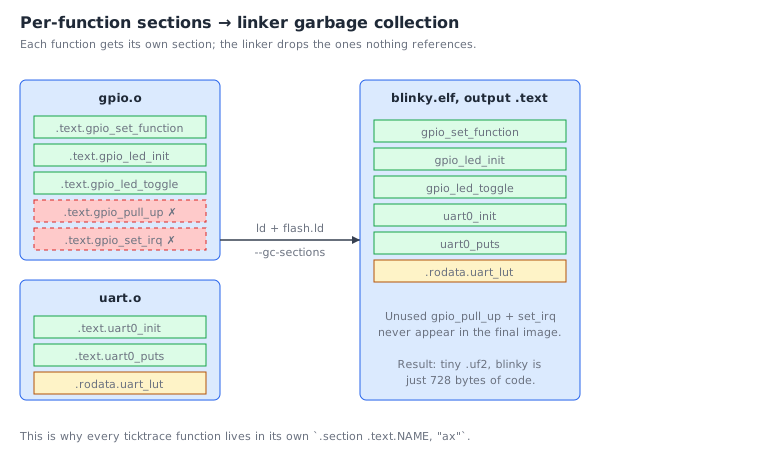
The linker script in link/flash.ld then groups all .text.* sections
into one final .text output section, all .rodata.* into .rodata,
and so on. The result is laid out in flash starting at 0x10000000,
see the image-layout figure in chapter 6.
You don't have to write linker scripts to follow this book, flash.ld
already exists and the Makefile uses it. But it's good to know the
mechanism is there.
A miniature cheat sheet
Print this and keep it next to your keyboard:
| Want to… | Instruction |
|---|---|
| Set a register to a small constant | movs r0, #N |
| Set a register to a 32-bit constant | ldr r0, =0xFFFFFFFF |
| Copy a register | mov r0, r1 |
| Add | adds r0, r1, r2 |
| Subtract | subs r0, r1, r2 |
| Bitwise AND / OR / XOR | ands / orrs / eors |
| Shift left / right | lsls r0, r1, #N / lsrs r0, r1, #N |
| Load 32 bits from memory | ldr r0, [r1] |
| Store 32 bits to memory | str r0, [r1] |
| Load a byte | ldrb r0, [r1] |
| Compare | cmp r0, r1 |
| Branch if equal/not equal | beq label / bne label |
| Call a function | bl func |
| Return | bx lr or pop {…, pc} |
| Save registers | push {r4, r5, lr} |
| Restore and return | pop {r4, r5, pc} |
That's most of everything you'll see. A more complete reference lives in appendix B.
Exercises
-
Decode a section line. What do the flag letters in
.section .text.foo, "ax"mean? What about.section .bss.x, "aw", %nobits? (a = allocate, x = executable, w = writable, %nobits = the section takes no space in the file image; the loader just reserves RAM.) -
Local vs global. Which of these labels are visible to other files?
main:,.Lloop:,1:,gpio_init:. (mainandgpio_initare global if.globalwas used..L…and numeric labels are file-local.) -
Trace an address calc. Hand-execute
lsls r2, r0, #3; adds r2, #4withr0 = 7. What's inr2? (7 × 8 = 56, + 4 = 60.) -
Find the literal pool. Open
build/blinky.elfwitharm-none-eabi-objdump -dand find aldr r0, [pc, #N]instruction. Where in the disassembly is the 4-byte constant it's loading? -
Why per-function sections? Looking at the section-linking figure, what would change in the final binary if every function in
gpio.Swere in one big.text.gpiosection? (The linker couldn't drop unused functions individually, the whole gpio block would either be included or excluded together, blowing up the binary.)
The next chapter explains the conventions around how functions push, pop, and call each other the rules that make all the ticktrace drivers compose.
← Chapter 6: Your first program · Table of contents · Chapter 8: Functions and the calling convention →