Chapter 9: GPIO and memory-mapped I/O
The chip's CPU and its peripherals are separate hardware blocks, but they share an address space. To talk to a peripheral you just read or write memory, at certain special addresses. This is called memory-mapped I/O, or MMIO, and it is the foundation of every peripheral driver you'll write.
This chapter walks through GPIO, the simplest peripheral, and shows the patterns that recur everywhere else.
What is GPIO?
GPIO stands for general-purpose input/output. A GPIO pin is a physical wire that comes out of the package; you can configure it to be either an input (the chip reads its voltage) or an output (the chip drives it high or low).
The RP2350 has 48 user GPIOs, numbered GP0 through GP47. On the Pico 2 board, 30 of them are broken out to header pins. GP25 is wired to the onboard green LED, that's the one we've been blinking.
Memory-mapped registers
Every peripheral on the RP2350 has a block of registers, 32-bit slots at known memory addresses. Reading and writing those slots is how you control the peripheral.
For GPIO, the relevant register blocks are:
- IO_BANK0 at
0x40028000, per-pin configuration (function select, interrupt enables). - PADS_BANK0 at
0x40038000, per-pad electrical settings (drive strength, pull-up/down, input/output enable). - SIO at
0xD0000000, single-cycle I/O. The actual "is this pin currently high?" and "drive this pin high/low" registers. SIO is attached directly to the CPU bus for speed.
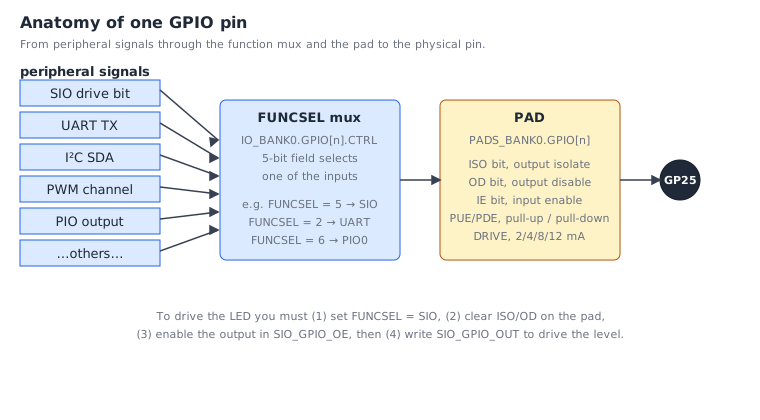
You'll meet all three in this chapter.
The simplest possible thing
Let's set GP25 high. To do that we need to:
- Configure GP25 as a software-controlled GPIO (function 5 = SIO).
- Clear the pad's
ISO/ODreset bits so the pad actually drives. - Enable the output direction.
- Write a 1 to the SIO output bit for pin 25.
Here is the code, the long way:
    @ 1. FUNCSEL = 5 (SIO) on GP25.
    @    GPIO[n].CTRL = IO_BANK0_BASE + 4 + n*8 = 0x40028000 + 4 + 200 = 0x400280cc
    ldr     r0, =0x400280CC
    movs    r1, #5
    str     r1, [r0]

    @ 2. Clear ISO + OD on PAD 25.
    @    PAD[n] = PADS_BANK0_BASE + 4 + n*4 = 0x40038000 + 4 + 100 = 0x40038068
    @    ISO = bit 8, OD = bit 7  ->  mask = 0x180.  Use the +0x3000 CLR alias.
    ldr     r0, =0x4003B068             @ PADS_BANK0_BASE + 0x3000 + offs
    movs    r1, #0x180
    str     r1, [r0]

    @ 3. SIO_GPIO_OE_SET = SIO_BASE + 0x38.  Set bit 25 = output enable.
    ldr     r0, =0xD0000038
    movs    r1, #1
    lsls    r1, #25
    str     r1, [r0]

    @ 4. SIO_GPIO_OUT_SET = SIO_BASE + 0x28.  Set bit 25 = drive high.
    ldr     r0, =0xD0000028
    movs    r1, #1
    lsls    r1, #25
    str     r1, [r0]
Four operations, each a constant load and a store. The LED is now on.
That is the bare metal. Every step is a memory access. There's no
function call, no driver, no abstraction; this is what the silicon
literally does when gpio_led_init runs.
A look at the CTRL register
Step 1 wrote a 5 to the per-pin CTRL register. That register has
several fields packed into 32 bits, we wrote only the bottom 5 bits
(FUNCSEL) and left the others at their reset value of zero.
![GPIO[n].CTRL bit-field layout](/book-figures/gpio-ctrl-register.svg)
For 99% of pin setup you only touch FUNCSEL. The override fields are there for advanced cases, forcing an output high regardless of what the peripheral wants, inverting an input, etc.
The atomic alias trick
Look at step 2 above. It uses the address 0x4003B068, not
0x40038068. The difference is 0x3000, which is the CLR alias offset.
Storing 0x180 to the CLR alias atomically clears bits 7 and 8 of the
underlying register, no read-modify-write, no race with an interrupt
that might touch another bit of the same register.
We met these in chapter 4. To recap:
| Offset | Effect on the underlying register |
|---|---|
+0x0000 |
Normal read/write |
+0x1000 |
Atomic XOR, reg ^= value for set bits |
+0x2000 |
Atomic SET, reg |= value for set bits |
+0x3000 |
Atomic CLR, reg &= ~value for set bits |
You will use these constantly. ticktrace's headers define handy symbols
for them: look in include/rp2350.inc for ATOMIC_XOR_OFFS,
ATOMIC_SET_OFFS, ATOMIC_CLR_OFFS.
Using symbolic names
That earlier code with 0x400280CC is correct but unreadable. Let's
use the symbolic register names from include/:
    .include "rp2350.inc"
    .include "gpio.inc"
    .include "pads.inc"

    @ FUNCSEL = SIO on GP25
    ldr     r0, =IO_BANK0_BASE + 4 + 25 * 8
    movs    r1, #GPIO_FUNC_SIO
    str     r1, [r0]

    @ Clear ISO + OD on PAD 25 via the CLR alias
    ldr     r0, =PADS_BANK0_BASE + ATOMIC_CLR_OFFS + 4 + 25 * 4
    ldr     r1, =(PADS_GPIO_ISO_BITS | PADS_GPIO_OD_BITS)
    str     r1, [r0]

    @ Enable output on GP25 via SIO_GPIO_OE_SET
    ldr     r0, =SIO_BASE + SIO_GPIO_OE_SET_OFFS
    movs    r1, #1
    lsls    r1, #25
    str     r1, [r0]

    @ Drive GP25 high via SIO_GPIO_OUT_SET
    ldr     r0, =SIO_BASE + SIO_GPIO_OUT_SET_OFFS
    movs    r1, #1
    lsls    r1, #25
    str     r1, [r0]
Same code, readable. The .include "gpio.inc" line pulls in all the
GPIO constant definitions; pads.inc does the same for PADS_BANK0;
rp2350.inc is the master file with the base addresses.
The driver version
Now compare with the actual gpio_led_init in src/gpio.S:
gpio_led_init:
    @ PAD CLR (ISO | OD)
    ldr     r0, =PADS_BANK0_BASE + 0x3000 + 4 + LED_PIN * 4
    ldr     r1, =PADS_GPIO_ISO_BITS | PADS_GPIO_OD_BITS
    str     r1, [r0]

    @ FUNCSEL = SIO
    ldr     r0, =IO_BANK0_BASE + 4 + LED_PIN * 8
    movs    r1, #GPIO_FUNC_SIO
    str     r1, [r0]

    @ OE SET
    ldr     r0, =SIO_BASE + SIO_GPIO_OE_SET_OFFS
    movs    r1, #1
    lsls    r1, #LED_PIN
    str     r1, [r0]

    @ Start low
    ldr     r0, =SIO_BASE + SIO_GPIO_OUT_CLR_OFFS
    movs    r1, #1
    lsls    r1, #LED_PIN
    str     r1, [r0]

    bx      lr
Exactly what we wrote above, plus a final OUT_CLR to put the LED in a
known-off state, plus a bx lr to return.
And gpio_led_toggle is the single XOR store we keep advertising:
gpio_led_toggle:
    ldr     r0, =SIO_BASE + SIO_GPIO_OUT_XOR_OFFS
    movs    r1, #1
    lsls    r1, #LED_PIN
    str     r1, [r0]
    bx      lr
Three setup instructions and one store. ~6 cycles total. Including
the bl to call it, the whole toggle round trip is under ten cycles.
This is what "every cycle matters" means in practice.
Reading a pin
To check whether a pin is currently high or low, read SIO_GPIO_IN:
    ldr     r0, =SIO_BASE + SIO_GPIO_IN_OFFS
    ldr     r0, [r0]            @ r0 = bitmap of all 32 low-bank pins
    lsrs    r0, #15             @ shift pin 15 into bit 0
    movs    r1, #1
    ands    r0, r1              @ mask everything else
    @ r0 = 0 or 1
Same pattern as before: load a base, read/write through it.
Generalising: any peripheral
GPIO is a special case in one sense (it has the super-fast SIO bank), but the pattern, base address plus register offset plus atomic alias, is universal on this chip. Here's how the other peripherals look at the same level of abstraction:
| Peripheral | Base | Pattern |
|---|---|---|
| GPIO config | IO_BANK0_BASE |
per-pin 8-byte stride |
| PADS | PADS_BANK0_BASE |
per-pin 4-byte stride |
| GPIO drive | SIO_BASE |
single bit per pin in a 32-bit word |
| UART | UART0_BASE |
fixed register offsets |
| I2C | I2C0_BASE |
fixed register offsets |
| Timer | TIMER0_BASE |
fixed register offsets |
| DMA | DMA_BASE |
per-channel 0x40 stride |
Every driver is "compute a register address, store/load a value, return". That's it. The complexity is in which register and which bits, i.e. in the datasheet, not in the CPU instructions.
A larger exercise
Try this on your hardware:
- Pick an unused pin (say GP15) and wire an LED to it (with a current- limiting resistor of ~330 Ω to GND).
- Write a function
gpio15_initmodelled ongpio_led_initbut for pin 15. - Write
gpio15_set_highandgpio15_set_lowusing SIO_GPIO_OUT_SET and SIO_GPIO_OUT_CLR. - In your
main, callgpio15_init, then alternategpio15_set_highandgpio15_set_lowwith the existingDELAY_COUNTbusy-loop between them.
If both LEDs blink, you have a working GPIO driver of your own.
Exercises
-
Compute an address. What is the absolute byte address of the FUNCSEL field for GP12? (0x40028000 + 4 + 12 × 8 = 0x40028064.)
-
Pick a function. Looking at the CTRL register figure, you want to route GP6 to PWM. Which value goes into FUNCSEL? (4,
GPIO_FUNC_PWM, defined ininclude/gpio.inc.) -
Atomic vs not. Why does
gpio_set_functionuse a non-atomic store (juststr), whilegpio_led_inituses the +0x3000 CLR alias for the PAD register? (FUNCSEL is a single 5-bit field that needs to be set to one specific value with the rest zero, a plain store does it in one cycle. The pad register has multiple independent bits set at reset; clearing just two of them without touching the others requires the CLR alias.) -
One toggle is two cycles. Read the
gpio_led_togglesource. Trace each instruction's cost. Why is the entire toggle so cheap? (One LDR address-constant, one MOVS, one LSLS, one STR to the XOR alias. The atomic XOR happens in the SIO hardware, not in CPU instructions.) -
Build a project. Wire two LEDs (to GP14 and GP15, each through 330 Ω). Write a Knight Rider-style scanner that bounces between them. Use only the ticktrace GPIO functions plus your own busy-wait.
What's next
The next chapter looks at the UART driver, which sends bytes one at a time through a serial port. The pattern is the same, write to registers, but the registers are richer, and we'll see how to wait for hardware to be ready.
← Chapter 8: Functions and the calling convention · Table of contents · Chapter 10: UART →