ticktrace, is an SDK that helps you get extremely up close to the silicon, which means that there is no bloat, no training wheels, and no BS. As an example, the blinky it generates fits in 1192 bytes of .text. That's the entire program, which includes Clock-tree bring-up to 150 MHz, UART initialization, GPIO driver, Dual-core scaffolding, everything you need, and nothing more.
The toolchain you install to build it is 5.6 MB. No gcc, no newlib, no libstdc++. Just arm-none-eabi-as, -ld, -objcopy, and a few siblings. There's nothing to compile, because the entire SDK is assembly. If there was ever a comparison, this would be like driving an Indy 500 race car. Pure seat of the pant experience.
That's the elevator pitch. Here's the longer version.
Why this. Why not use the standard toolchain?
I write firmware for motor control. In that world, the latency of an ISR matters down to the cycle. The jitter on a PWM edge can wreck a control loop. "The compiler probably did the right thing" is not an acceptable answer to "why did the rotor stall."
Before ticktrace I lived in two languages on this chip.
C, usually with the pico-sdk. Powerful. The SDK takes care of bring-up, clocks, USB, every block you'd otherwise spend a month on. That safety is worth a lot. But the abstractions stack up, the build system grows tentacles, and you start asking the compiler not to reorder this load, not to inline that function, to please honor your timing budget. At some point you realize you've been arguing with a tool that doesn't share your goals. Power, yes. Predictability, only if you fight for it.
TinyGo. A small miracle: Go on a microcontroller, with a syntax I genuinely enjoy. For prototyping it's hard to beat. But the runtime, the GC, the reflection metadata, they show up in the binary, and for the tight inner loops of a motor controller the indirection is exactly the thing you can't afford.
Both languages have their place. Neither was the right tool for the work I actually wanted to do, which is write the exact sequence of instructions that hits the wire at the exact cycle I expect.
ticktrace is what that looks like when you take it seriously. I have immense admiration for the pico-sdk, Tinygo, and other higher level abstractions, and I am not trying to dissuade anyone from using those. I just felt that there had to be a lower level programming paradigm than "C" which is usually treated as the defacto low-level embedded programming language. That is when I went back to my roots and started relearning Assembly, which I had not touched since my undergraduate days 25+ years ago.
What pure assembly actually looks like
People hear "assembly" and picture something illegible. Here is the entire main function of the default firmware. This is the actual source, line for line, from src/main.S:
    .thumb_func
    .global main
main:
    @ ---- Clock tree bring-up ---------------------------------------------
    bl      xosc_init                       @ XOSC stable
    bl      pll_sys_150_mhz                 @ pll_sys = 150 MHz
    bl      pll_usb_48_mhz                  @ pll_usb = 48 MHz
    bl      clocks_init                     @ wire muxes
    bl      tick_init                       @ 1 MHz tick to TIMER0/1/WDG
    bl      watchdog_disable                @ explicit safe state

    @ ---- Peripheral init at the new clock rate ---------------------------
    bl      gpio_led_init                   @ LED on GP25
    bl      uart0_init                      @ wrong baud (computed for 12 MHz)
    bl      clocks_post_pll_uart_baud_fixup @ fix to 150 MHz divisors

    ldr     r0, =banner
    bl      uart0_puts

.Lloop:
    bl      gpio_led_toggle

    @ 3-cycle inner body (subs + bne) at 150 MHz = 20 ns / iteration.
    @ DELAY_COUNT = 12_500_000 -> 250 ms half-period -> ~2 Hz blink.
    ldr     r0, =DELAY_COUNT_150MHZ
1:  subs    r0, #1
    bne     1b

    b       .Lloop
Every line is either a bl to a named driver function or a register-level operation that does exactly what it says. The delay loop has its cycle cost written next to it, in comments that are true because the comment is computed from the same instructions the silicon executes. There's no compiler in between.
The drivers it calls (xosc_init, pll_sys_150_mhz, gpio_led_toggle, uart0_puts) are themselves plain Thumb-2 functions following the same AAPCS convention. You can bl into them from your own assembly, from C, or from Rust, and they behave identically because there is no wrapper layer.
The pattern that emerges
When you commit to this, some patterns stop being decoration and start being load-bearing.
Atomic aliases everywhere. The RP2350 (like the RP2040) maps every peripheral register at four addresses: the base, base+0x1000 (XOR), base+0x2000 (SET), base+0x3000 (CLR). One 32-bit STR to the SET alias atomically sets bits; one to CLR clears them; no read-modify-write, no scratch register, no race with an ISR that touched the same register one cycle ago. Every driver in ticktrace uses these aliases for every multi-bit write. In a C HAL, you might get atomic writes if the compiler felt like it. Here they're the only kind of write the code does.
Pad isolation, explicitly. RP2350 pads come out of reset with ISO=1, an erratum that catches people. Every driver that touches a GPIO clears ISO|OD via the PADS_BANK0 CLR alias, on purpose. The reason is in a comment three lines up. If you're reading the driver, you find out why it works without leaving the file.
AAPCS throughout. All 34 drivers are plain Thumb-2 functions: arguments in r0-r3, return in r0, callee-saves preserved, stack 8-byte aligned at call boundaries. That isn't a stylistic choice. It's the contract that lets a C app, a Rust crate (rp-asm-sys), and another assembly program all call into the same drivers without an FFI layer. The C bridge is just extern void gpio_set_out(uint32_t pin); and the Rust bridge is just a #[link_name] attribute.
Image size you can budget. Default blinky with the full driver set linked is 1192 bytes. Each example UF2, because the linker garbage-collects unused drivers, is under 4 KB. The largest example, the multicore USB demo, lands at 5.34 KB. The Cortex-M33 has 512 KB of SRAM. That leaves you plenty of space to do whatever else you like.
The toolchain story
Most "embedded SDKs" install something like 150 MB of toolchain on first run. ARM's official GNU Toolchain release is bigger than that, and most of it is the C compiler, the C++ standard library, newlib, and gdb. Things ticktrace will never invoke.
So I split the toolchain out. There's a separate repo, ticktrace-sdk/binutils-arm-none-eabi, with a CI workflow that builds upstream binutils-gdb sources for four platforms (Linux x86/arm64, Apple Silicon, Windows x86-64), with everything you don't need disabled at configure time: --disable-gold --disable-sim --disable-gdb --disable-nls --disable-shared. The result is 5.6 MB compressed, 14 MB on disk. Ten binaries: arm-none-eabi-{as,ld,objcopy,objdump,size,nm,readelf,strip,ar,ranlib}. That's the full set ticktrace ever invokes.
I also built a companion app that wraps the SDK with a TOML catalog and two front-ends: a CLI and a cross-platform desktop GUI. It builds the same images the Makefile does and adds feature pickers, in-app picotool flashing, board detection, custom bootloader support, and example browsing.
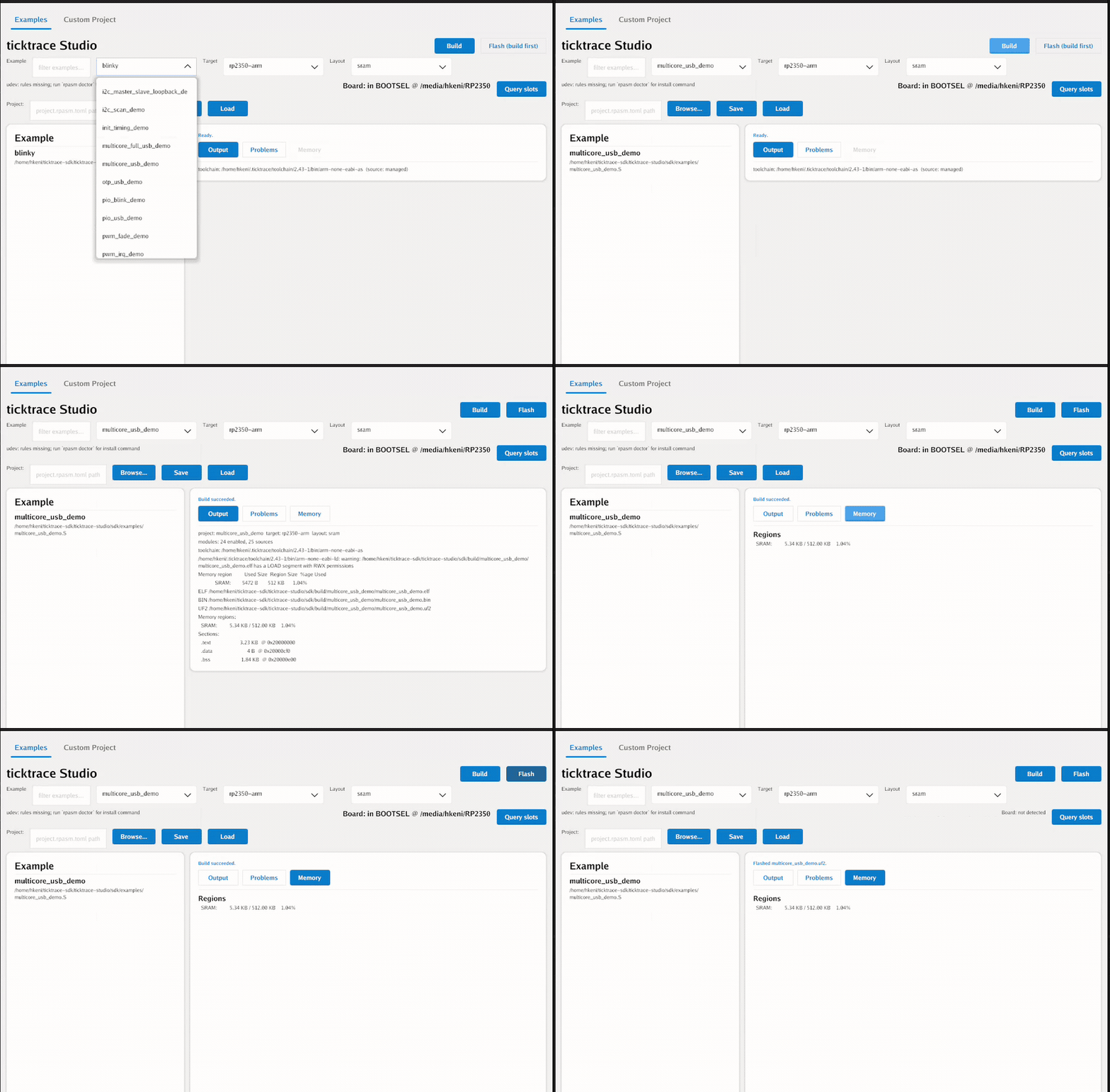
ticktrace Studio's first-run flow asks if you want a managed toolchain. If you say yes, it downloads that 5.6 MB release into ~/.ticktrace/toolchain/<version>/, verifies the SHA-256 against an embedded manifest, and you're building. If you already have an arm-none-eabi-as on PATH (Homebrew, scoop, ARM's official installer, your distro's package), Studio finds it via a hybrid search and skips the download entirely.
The total install footprint of "everything you need to build ticktrace firmware" is the SDK (a couple of MB of source) + the toolchain (5.6 MB). The install fits the SDK's minimalism instead of fighting it.
What it covers
Eighteen peripheral drivers, all in src/:
- GPIO/PADS (48-pin control, IRQ, pad isolation)
- UART (full PL011, 115200 8N1 out of the box)
- I2C (DesignWare I2C0/1, master + slave)
- SPI (PL022, full duplex, DMA chained)
- USB CDC-ACM (plug in and get a serial port)
- DMA (16-channel, mem-to-mem, and peripheral)
- PWM (12-slice, freq/duty helpers, servo cookbook)
- Timers (TIMER0/1, SysTick, NVIC plumbing)
- PIO (controller side, hand-encoded programs)
- ADC (8-channel + on-chip temperature sensor)
- SHA-256 (hardware accelerated)
- TRNG (hardware random number generator)
- Multicore (dual-core launch, SIO FIFO, hardware spinlocks, interpolators)
- Flash / XIP (QMI tuning, OTP reads, BOOTSEL trick)
- Trace (DWT cycle counter, ITM/TPIU/ETM for on-hardware profiling)
- Scheduler (NVIC-priority cooperative scheduler)
- SPSC queue (lock-free ISR-to-task byte queue)
- HSTX (Coming soon)
Plus a C bridge and a Rust bridge for apps that want to live in those languages while keeping the drivers in assembly. Plus 51 examples in examples/, one per peripheral, each building to its own UF2.
Verified on silicon
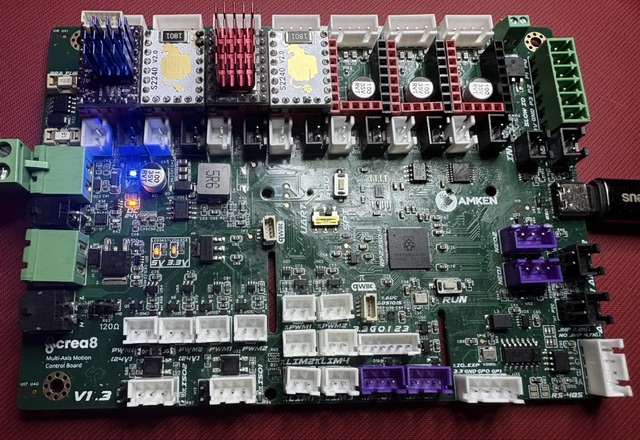
This is firmware. The only test that matters is whether it runs on real silicon. The board above is the crea8 V1.3, a multi-axis motion control board I designed around the RP2350, and it's the workbench target ticktrace is daily-driven on. ticktrace runs four tiers:
- T1: Unicorn (283 tests). A host-side ARM emulator harness. Each driver function gets at least one register-trace assertion: after this call, this register should hold this value. Fast (~2 s for all 283), deterministic, runs in CI on every push.
- T2: QEMU semihosting smoke tests. ISA-level checks that catch things Unicorn doesn't model (memory ordering edge cases, some I/O quirks).
- T3: Renode. Platform-level integration tests with a model of the RP2350 board. Slow, runs nightly.
- T4: hardware. A real Raspberry Pi Pico 2 board on the workbench. Every driver has been observed working there; bring-up logs of the firmware-as-shipped are checked into
docs/.
All four green at release. The whole suite (T1, T2, T3, plus a Go-tools test pass) runs in about 90 seconds locally; the docker :full image bundles everything you need to reproduce it.
How to try it
The fastest path, on any of Mac, Windows, Linux, with no toolchain to install:
docker run --rm -v "$PWD":/workspace ghcr.io/ticktrace-sdk/sdk:slim
That mounts the current directory into a container with binutils preinstalled, runs make inside, and drops blinky.uf2 plus every example into ./build/. Drag any .uf2 onto a Pico 2 in BOOTSEL mode and you're running.
If you'd rather have a GUI: ticktrace Studio is a cross-platform single-binary GUI (macOS arm64, Windows, Linux) that bundles the same toolchain and adds a catalog browser, build log, memory map view, and one-click BOOTSEL flash. Studio's Custom Project tab handles the cases where you want to wire in your own .S file or push an A/B bootloader image.
License
ticktrace is dual-licensed.
- AGPL-3.0-or-later for open-source, personal, educational, and evaluation use. Free, and stays free.
- Commercial license from Amken LLC for proprietary firmware that can't comply with the AGPL. The commercial side funds the time to keep this maintained and silicon-verified rather than abandoned in a year. Same model as Qt and MySQL. Contact licensing@ticktrace.io.
Where it goes from here
ticktrace is RP2350-only in v1. The RP2040 (the M0+ in the original Pico) is on the roadmap for v2; the work is mostly stripping ISA-version assumptions and adding a second clock-tree variant. Universal2 macOS binaries (so Intel Macs get the one-click Studio install too) are also v2.
Beyond that: more drivers (Ethernet PHYs, the second-bank flash interfaces, anything the community asks for and someone wants to write), more cookbook recipes, and a debugger story (gdb plus probe-rs integration). A book is in progress that walks through the SDK from _reset to multicore in fourteen chapters.
If any of this is interesting, the repo is at github.com/ticktrace-sdk/rp-asm, Studio downloads at github.com/ticktrace-sdk/ticktrace-studio/releases, and the site is ticktrace.io. Questions, bug reports, and pull requests are welcome.
Every byte is a line you can read. That was the goal. The 1192 bytes of blinky are the proof.